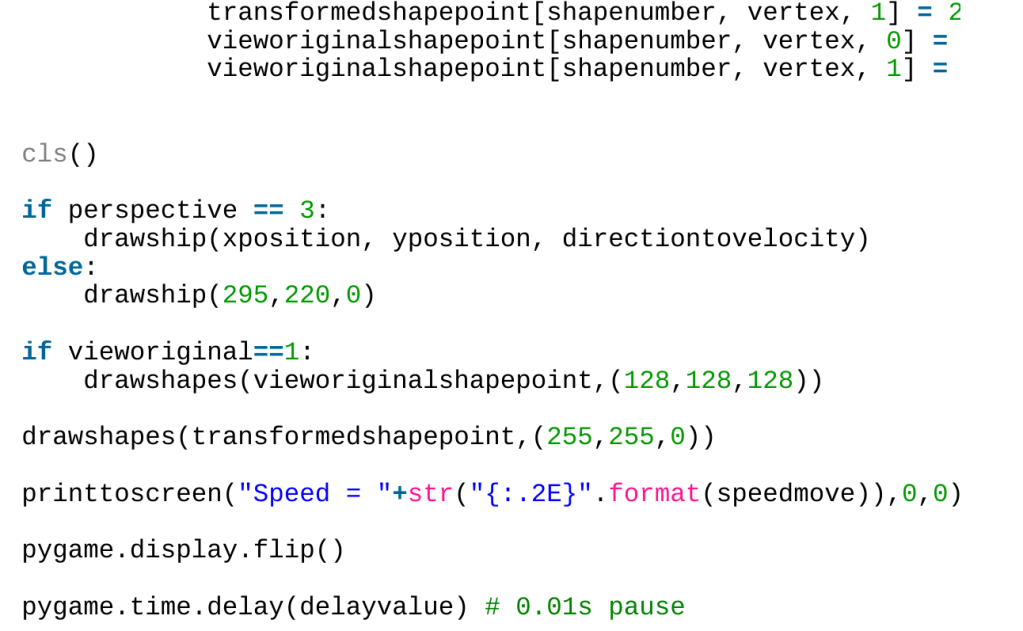
Apparently, using BASIC in 2024 is considered childish, so I decided to port the special relativity two-dimensional length contraction simulation over to Python. It’s been a few years since I last used Python (except for running a few scripts here and there, or writing stuff for the Raspberry Pi). The only languages I’d ever used for graphical stuff were BASIC and Matlab (or shoving something into IDL using a C wrapper to visualise three-dimensional arrays produced in Fortran 90). I’ve done other sorts of coding with Python, such as writing routines to model the slip dissolution mechanism of stress corrosion cracking, where the stresses were modelled using a finite element analysis tool called Code_Aster and visualised using Salome_Meca. When it comes to writing games, or doing anything graphical where a bit more freedom was needed to just draw lines, my goto language was BASIC (goto pun intended).
I decided to get ChatGPT to teach me how to use Pygame. But before I started using Pygame, I had to clear up some issues I had with Python. Coding has moved on since the days of BASIC, particularly when it comes to data structures. I asked ChatGPT:
I am a BASIC programmer. Please explain to me like I’m an idiot what a class is
ChatGPT gave some waffle about how classes are templates that create objects, grouping related attributes and methods into a single reusable unit. Nope, I’m baffled. How can an object contain variables and functions at the same time? My simple BASIC brain cannot comprehend this idea. What’s an object in Python anyway? For that matter, what’s an attribute? What’s a method? Are methods functions? Are attributes variables? Life was much simpler when there were constants, variables, functions, and subroutines. What was __init__, and why did it need two underscores at the start and end? Why both with the self parameter if it is always needed? What’s a dunder?
I finally got my head around it, but decided not to bother with classes because it seemed like an unnecessary complication. In my head I knew what I wanted to create, and adding an extra step to make the code more readable to someone else seemed unnecessary. The more I read about classes, the more irritated I got.
After that initial frustration with Python, I decided what I needed were a few BASIC tools translated over to Python. I needed:
- The use of multi-dimensional arrays
- The ability to draw lines
- The ability to get input from the keyboard
So I asked ChatGPT, how do I use arrays, like I easily can in BASIC, in Python. It told me not to use arrays, but to use lists, which are more common. No, I want to use arrays.
“But lists are highly versatile and can store elements of different data types,” ChatGPT protested. No. I want arrays. So ChatGPT told me I can use arrays, but only if I import the array module. What? Why isn’t it built in by default? I have to manually import the ability use arrays?
Oh, it gets better, because ChatGPT then told me that I can do more advanced numerical operations on arrays by importing the numpy module. Fair enough, I’ll use numpy then.
Pygame, it turned out, was pretty simple to use and fast enough that a simple screen-clear between each screen before flipping the screens was good enough. There are, I am sure, some very sophisticated things I can do with pygame, but I just wanted to port my BASIC code straight over. It turns out that wasn’t difficult.
I was pleased to see I didn’t have to define pi, but frustrated that I had to import math(s) before I could do cosines and sines. I was pleased the atan2 function was there though. Still, I am not sure where that stuff needs to be important specially. It seems odd to me.
The keyboard input handling of pygame is significantly better than on BASIC, and things do run faster (although I believe that is just because I was running BASIC in Dosbox). I’m sure I’ll be able to do better stuff with pygame when I figure out sprites, using it for sound or for better graphics. None of that was necessary for this simple project.
It took a few hours of tinkering, not long really, to transfer the code from BASIC to Python, but here we are. One bit that I’m not happy with is the DATA – READ equivalent in Python. Apparently, there isn’t one, but I suppose I could import the shape data somehow from a file, which would tidy the code up a bit.
If you want to run the code below, the keyboard shortcuts are:
- Q: Quit
- P: Pause
- Up: Go faster
- Down: Go slower
- Left: Increase anticlockwise angular velocity
- Right: Decrease anticlockwise angular velocity
- F: Change angular velocity to zero
- H: Change speed to zero
- O: Show unwarped shapes
- S: Toggle between shapes to view
- V: Shift from first person to third person (incorrect) view
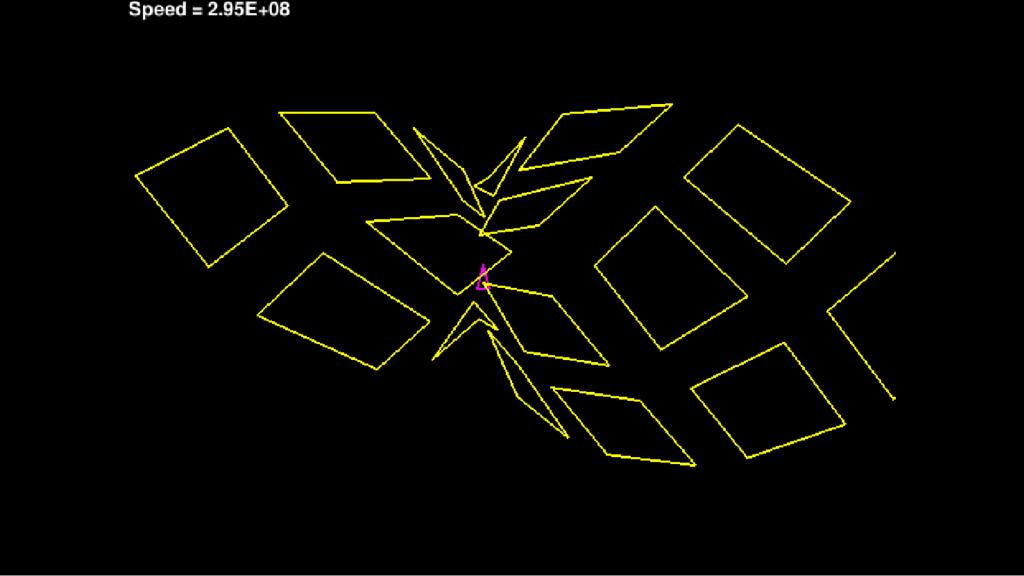
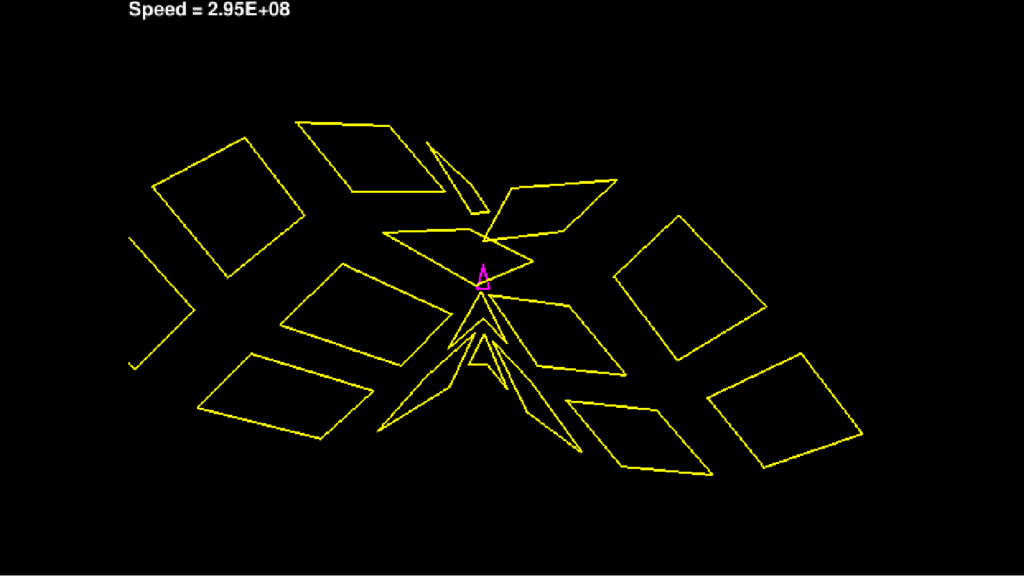
Here are some screenshots of the code running:


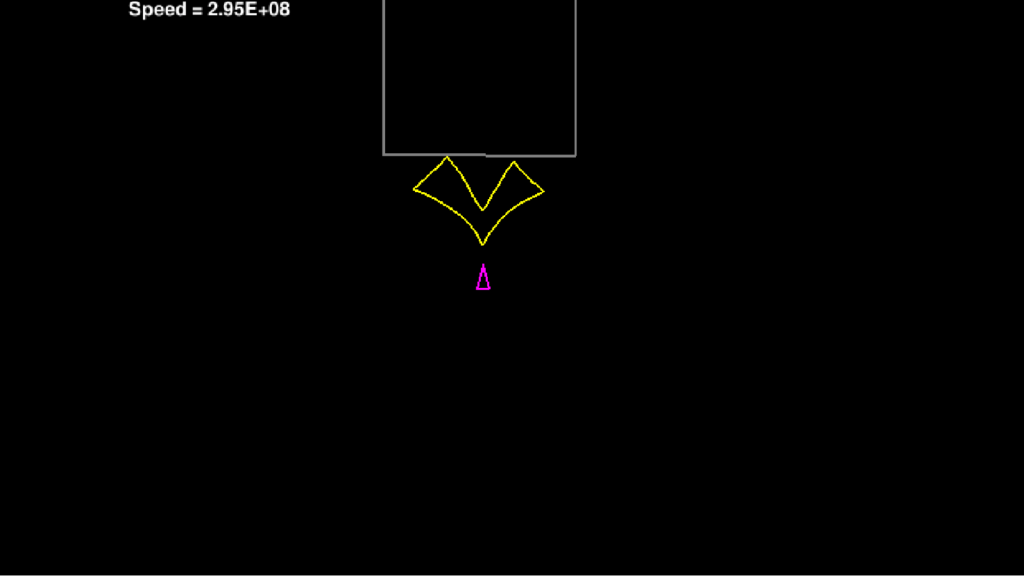
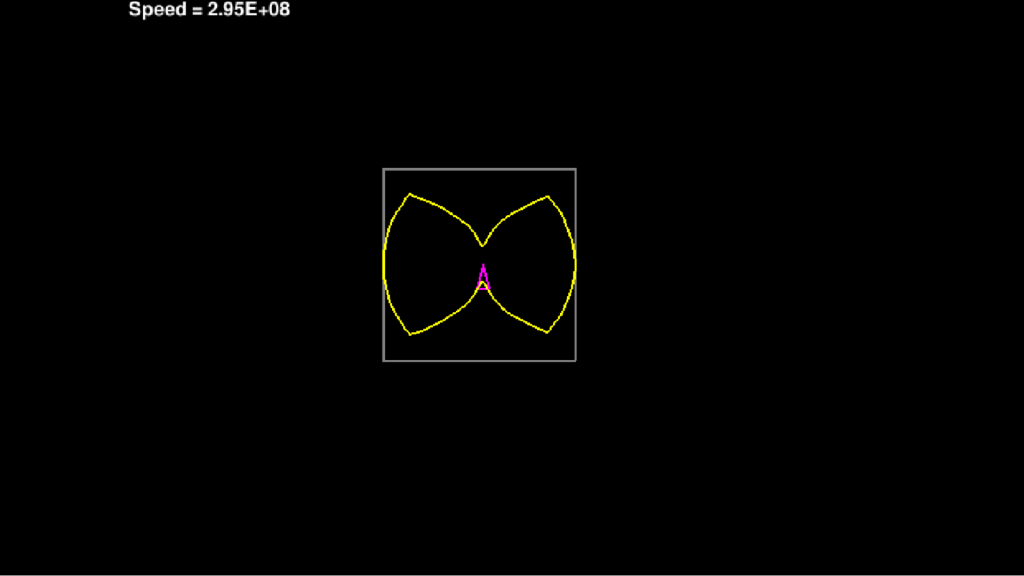
“Python” Code (click here to show)
import math
import numpy
import pygame
import sys
from pygame.locals import * # No idea what this does, but you need it for QUIT

def initialise_shape_arrays(shapepoint, shapeis):
    if shapeis == 1:
        shapepoint[0, 0, 0] = 1
        shapepoint[0, 1, 0] = 106
        shapepoint[0, 2, 0] = 106
        shapepoint[0, 3, 0] = 1
        shapepoint[0, 4, 0] = 1
        shapepoint[1, 0, 0] = 161
        shapepoint[1, 1, 0] = 266
        shapepoint[1, 2, 0] = 266
        shapepoint[1, 3, 0] = 161
        shapepoint[1, 4, 0] = 161
        shapepoint[2, 0, 0] = 321
        shapepoint[2, 1, 0] = 426
        shapepoint[2, 2, 0] = 426
        shapepoint[2, 3, 0] = 321
        shapepoint[2, 4, 0] = 321
        shapepoint[3, 0, 0] = 481
        shapepoint[3, 1, 0] = 586
        shapepoint[3, 2, 0] = 586
        shapepoint[3, 3, 0] = 481
        shapepoint[3, 4, 0] = 481
        shapepoint[4, 0, 0] = 1
        shapepoint[4, 1, 0] = 106
        shapepoint[4, 2, 0] = 106
        shapepoint[4, 3, 0] = 1
        shapepoint[4, 4, 0] = 1
        shapepoint[5, 0, 0] = 161
        shapepoint[5, 1, 0] = 266
        shapepoint[5, 2, 0] = 266
        shapepoint[5, 3, 0] = 161
        shapepoint[5, 4, 0] = 161
        shapepoint[6, 0, 0] = 321
        shapepoint[6, 1, 0] = 426
        shapepoint[6, 2, 0] = 426
        shapepoint[6, 3, 0] = 321
        shapepoint[6, 4, 0] = 321
        shapepoint[7, 0, 0] = 481
        shapepoint[7, 1, 0] = 586
        shapepoint[7, 2, 0] = 586
        shapepoint[7, 3, 0] = 481
        shapepoint[7, 4, 0] = 481
        shapepoint[8, 0, 0] = 1
        shapepoint[8, 1, 0] = 106
        shapepoint[8, 2, 0] = 106
        shapepoint[8, 3, 0] = 1
        shapepoint[8, 4, 0] = 1
        shapepoint[9, 0, 0] = 161
        shapepoint[9, 1, 0] = 266
        shapepoint[9, 2, 0] = 266
        shapepoint[9, 3, 0] = 161
        shapepoint[9, 4, 0] = 161
        shapepoint[10, 0, 0] = 321
        shapepoint[10, 1, 0] = 426
        shapepoint[10, 2, 0] = 426
        shapepoint[10, 3, 0] = 321
        shapepoint[10, 4, 0] = 321
        shapepoint[11, 0, 0] = 481
        shapepoint[11, 1, 0] = 586
        shapepoint[11, 2, 0] = 586
        shapepoint[11, 3, 0] = 481
        shapepoint[11, 4, 0] = 481
        shapepoint[12, 0, 0] = 1
        shapepoint[12, 1, 0] = 106
        shapepoint[12, 2, 0] = 106
        shapepoint[12, 3, 0] = 1
        shapepoint[12, 4, 0] = 1
        shapepoint[13, 0, 0] = 161
        shapepoint[13, 1, 0] = 266
        shapepoint[13, 2, 0] = 266
        shapepoint[13, 3, 0] = 161
        shapepoint[13, 4, 0] = 161
        shapepoint[14, 0, 0] = 321
        shapepoint[14, 1, 0] = 426
        shapepoint[14, 2, 0] = 426
        shapepoint[14, 3, 0] = 321
        shapepoint[14, 4, 0] = 321
        shapepoint[15, 0, 0] = 481
        shapepoint[15, 1, 0] = 586
        shapepoint[15, 2, 0] = 586
        shapepoint[15, 3, 0] = 481
        shapepoint[15, 4, 0] = 481
        shapepoint[0, 0, 1] = 1
        shapepoint[0, 1, 1] = 1
        shapepoint[0, 2, 1] = 80
        shapepoint[0, 3, 1] = 80
        shapepoint[0, 4, 1] = 1
        shapepoint[1, 0, 1] = 1
        shapepoint[1, 1, 1] = 1
        shapepoint[1, 2, 1] = 80
        shapepoint[1, 3, 1] = 80
        shapepoint[1, 4, 1] = 1
        shapepoint[2, 0, 1] = 1
        shapepoint[2, 1, 1] = 1
        shapepoint[2, 2, 1] = 80
        shapepoint[2, 3, 1] = 80
        shapepoint[2, 4, 1] = 1
        shapepoint[3, 0, 1] = 1
        shapepoint[3, 1, 1] = 1
        shapepoint[3, 2, 1] = 80
        shapepoint[3, 3, 1] = 80
        shapepoint[3, 4, 1] = 1
        shapepoint[4, 0, 1] = 121
        shapepoint[4, 1, 1] = 121
        shapepoint[4, 2, 1] = 200
        shapepoint[4, 3, 1] = 200
        shapepoint[4, 4, 1] = 121
        shapepoint[5, 0, 1] = 121
        shapepoint[5, 1, 1] = 121
        shapepoint[5, 2, 1] = 200
        shapepoint[5, 3, 1] = 200
        shapepoint[5, 4, 1] = 121
        shapepoint[6, 0, 1] = 121
        shapepoint[6, 1, 1] = 121
        shapepoint[6, 2, 1] = 200
        shapepoint[6, 3, 1] = 200
        shapepoint[6, 4, 1] = 121
        shapepoint[7, 0, 1] = 121
        shapepoint[7, 1, 1] = 121
        shapepoint[7, 2, 1] = 200
        shapepoint[7, 3, 1] = 200
        shapepoint[7, 4, 1] = 121
        shapepoint[8, 0, 1] = 241
        shapepoint[8, 1, 1] = 241
        shapepoint[8, 2, 1] = 320
        shapepoint[8, 3, 1] = 320
        shapepoint[8, 4, 1] = 241
        shapepoint[9, 0, 1] = 241
        shapepoint[9, 1, 1] = 241
        shapepoint[9, 2, 1] = 320
        shapepoint[9, 3, 1] = 320
        shapepoint[9, 4, 1] = 241
        shapepoint[10, 0, 1] = 241
        shapepoint[10, 1, 1] = 241
        shapepoint[10, 2, 1] = 320
        shapepoint[10, 3, 1] = 320
        shapepoint[10, 4, 1] = 241
        shapepoint[11, 0, 1] = 241
        shapepoint[11, 1, 1] = 241
        shapepoint[11, 2, 1] = 320
        shapepoint[11, 3, 1] = 320
        shapepoint[11, 4, 1] = 241
        shapepoint[12, 0, 1] = 361
        shapepoint[12, 1, 1] = 361
        shapepoint[12, 2, 1] = 440
        shapepoint[12, 3, 1] = 440
        shapepoint[12, 4, 1] = 361
        shapepoint[13, 0, 1] = 361
        shapepoint[13, 1, 1] = 361
        shapepoint[13, 2, 1] = 440
        shapepoint[13, 3, 1] = 440
        shapepoint[13, 4, 1] = 361
        shapepoint[14, 0, 1] = 361
        shapepoint[14, 1, 1] = 361
        shapepoint[14, 2, 1] = 440
        shapepoint[14, 3, 1] = 440
        shapepoint[14, 4, 1] = 361
        shapepoint[15, 0, 1] = 361
        shapepoint[15, 1, 1] = 361
        shapepoint[15, 2, 1] = 440
        shapepoint[15, 3, 1] = 440
        shapepoint[15, 4, 1] = 361
    else:
        shapepoint[0, 0, 0] = 240
        shapepoint[0, 1, 0] = 250
        shapepoint[0, 2, 0] = 260
        shapepoint[0, 3, 0] = 270
        shapepoint[0, 4, 0] = 280
        shapepoint[1, 0, 0] = 280
        shapepoint[1, 1, 0] = 290
        shapepoint[1, 2, 0] = 300
        shapepoint[1, 3, 0] = 310
        shapepoint[1, 4, 0] = 320
        shapepoint[2, 0, 0] = 320
        shapepoint[2, 1, 0] = 330
        shapepoint[2, 2, 0] = 340
        shapepoint[2, 3, 0] = 350
        shapepoint[2, 4, 0] = 360
        shapepoint[3, 0, 0] = 360
        shapepoint[3, 1, 0] = 370
        shapepoint[3, 2, 0] = 380
        shapepoint[3, 3, 0] = 390
        shapepoint[3, 4, 0] = 400
        shapepoint[4, 0, 0] = 400
        shapepoint[4, 1, 0] = 400
        shapepoint[4, 2, 0] = 400
        shapepoint[4, 3, 0] = 400
        shapepoint[4, 4, 0] = 400
        shapepoint[5, 0, 0] = 400
        shapepoint[5, 1, 0] = 400
        shapepoint[5, 2, 0] = 400
        shapepoint[5, 3, 0] = 400
        shapepoint[5, 4, 0] = 400
        shapepoint[6, 0, 0] = 400
        shapepoint[6, 1, 0] = 400
        shapepoint[6, 2, 0] = 400
        shapepoint[6, 3, 0] = 400
        shapepoint[6, 4, 0] = 400
        shapepoint[7, 0, 0] = 400
        shapepoint[7, 1, 0] = 400
        shapepoint[7, 2, 0] = 400
        shapepoint[7, 3, 0] = 400
        shapepoint[7, 4, 0] = 400
        shapepoint[8, 0, 0] = 240
        shapepoint[8, 1, 0] = 250
        shapepoint[8, 2, 0] = 260
        shapepoint[8, 3, 0] = 270
        shapepoint[8, 4, 0] = 280
        shapepoint[9, 0, 0] = 280
        shapepoint[9, 1, 0] = 290
        shapepoint[9, 2, 0] = 300
        shapepoint[9, 3, 0] = 310
        shapepoint[9, 4, 0] = 320
        shapepoint[10, 0, 0] = 320
        shapepoint[10, 1, 0] = 330
        shapepoint[10, 2, 0] = 340
        shapepoint[10, 3, 0] = 350
        shapepoint[10, 4, 0] = 360
        shapepoint[11, 0, 0] = 360
        shapepoint[11, 1, 0] = 370
        shapepoint[11, 2, 0] = 380
        shapepoint[11, 3, 0] = 390
        shapepoint[11, 4, 0] = 400
        shapepoint[12, 0, 0] = 240
        shapepoint[12, 1, 0] = 240
        shapepoint[12, 2, 0] = 240
        shapepoint[12, 3, 0] = 240
        shapepoint[12, 4, 0] = 240
        shapepoint[13, 0, 0] = 240
        shapepoint[13, 1, 0] = 240
        shapepoint[13, 2, 0] = 240
        shapepoint[13, 3, 0] = 240
        shapepoint[13, 4, 0] = 240
        shapepoint[14, 0, 0] = 240
        shapepoint[14, 1, 0] = 240
        shapepoint[14, 2, 0] = 240
        shapepoint[14, 3, 0] = 240
        shapepoint[14, 4, 0] = 240
        shapepoint[15, 0, 0] = 240
        shapepoint[15, 1, 0] = 240
        shapepoint[15, 2, 0] = 240
        shapepoint[15, 3, 0] = 240
        shapepoint[15, 4, 0] = 240
        shapepoint[0, 0, 1] = 160
        shapepoint[0, 1, 1] = 160
        shapepoint[0, 2, 1] = 160
        shapepoint[0, 3, 1] = 160
        shapepoint[0, 4, 1] = 160
        shapepoint[1, 0, 1] = 160
        shapepoint[1, 1, 1] = 160
        shapepoint[1, 2, 1] = 160
        shapepoint[1, 3, 1] = 160
        shapepoint[1, 4, 1] = 160
        shapepoint[2, 0, 1] = 160
        shapepoint[2, 1, 1] = 160
        shapepoint[2, 2, 1] = 160
        shapepoint[2, 3, 1] = 160
        shapepoint[2, 4, 1] = 160
        shapepoint[3, 0, 1] = 160
        shapepoint[3, 1, 1] = 160
        shapepoint[3, 2, 1] = 160
        shapepoint[3, 3, 1] = 160
        shapepoint[3, 4, 1] = 160
        shapepoint[4, 0, 1] = 160
        shapepoint[4, 1, 1] = 170
        shapepoint[4, 2, 1] = 180
        shapepoint[4, 3, 1] = 190
        shapepoint[4, 4, 1] = 200
        shapepoint[5, 0, 1] = 200
        shapepoint[5, 1, 1] = 210
        shapepoint[5, 2, 1] = 220
        shapepoint[5, 3, 1] = 230
        shapepoint[5, 4, 1] = 240
        shapepoint[6, 0, 1] = 240
        shapepoint[6, 1, 1] = 250
        shapepoint[6, 2, 1] = 260
        shapepoint[6, 3, 1] = 270
        shapepoint[6, 4, 1] = 280
        shapepoint[7, 0, 1] = 280
        shapepoint[7, 1, 1] = 290
        shapepoint[7, 2, 1] = 300
        shapepoint[7, 3, 1] = 310
        shapepoint[7, 4, 1] = 320
        shapepoint[8, 0, 1] = 320
        shapepoint[8, 1, 1] = 320
        shapepoint[8, 2, 1] = 320
        shapepoint[8, 3, 1] = 320
        shapepoint[8, 4, 1] = 320
        shapepoint[9, 0, 1] = 320
        shapepoint[9, 1, 1] = 320
        shapepoint[9, 2, 1] = 320
        shapepoint[9, 3, 1] = 320
        shapepoint[9, 4, 1] = 320
        shapepoint[10, 0, 1] = 320
        shapepoint[10, 1, 1] = 320
        shapepoint[10, 2, 1] = 320
        shapepoint[10, 3, 1] = 320
        shapepoint[10, 4, 1] = 320
        shapepoint[11, 0, 1] = 320
        shapepoint[11, 1, 1] = 320
        shapepoint[11, 2, 1] = 320
        shapepoint[11, 3, 1] = 320
        shapepoint[11, 4, 1] = 320
        shapepoint[12, 0, 1] = 160
        shapepoint[12, 1, 1] = 170
        shapepoint[12, 2, 1] = 180
        shapepoint[12, 3, 1] = 190
        shapepoint[12, 4, 1] = 200
        shapepoint[13, 0, 1] = 200
        shapepoint[13, 1, 1] = 210
        shapepoint[13, 2, 1] = 220
        shapepoint[13, 3, 1] = 230
        shapepoint[13, 4, 1] = 240
        shapepoint[14, 0, 1] = 240
        shapepoint[14, 1, 1] = 250
        shapepoint[14, 2, 1] = 260
        shapepoint[14, 3, 1] = 270
        shapepoint[14, 4, 1] = 280
        shapepoint[15, 0, 1] = 280
        shapepoint[15, 1, 1] = 290
        shapepoint[15, 2, 1] = 300
        shapepoint[15, 3, 1] = 310
        shapepoint[15, 4, 1] = 320
    return shapepoint

def gamma(speedis):
    if speedis < 3E8:
        return 1 / math.sqrt(1 - (speedis/3E8)**2)
    else:
        return 3E38

def distancetovertex(xposition, yposition, xvertex, yvertex):
    return math.sqrt((xvertex-xposition)**2+(yvertex-yposition)**2)

def speed(xvelocity, yvelocity):
    return math.sqrt(xvelocity**2+yvelocity**2)

def printtoscreen(message,x ,y):
    font = pygame.font.Font(None, 24)
    text = font.render(message, True, (255,255,255))
    screen.blit(text, (x,y))

def drawshapes(shapepointer,colour):
    for shapenumber in range(0,16):
        for vertex in range(0, 4):
            pygame.draw.line(screen, colour, (shapepointer[shapenumber, vertex,0],shapepointer[shapenumber, vertex,1]),(shapepointer[shapenumber, vertex+1,0],shapepointer[shapenumber, vertex+1,1]),2)

def cls():
    screen.fill((0,0,0)) # clears the screen

def drawship(x, y, angle):
    point1x = x
    point1y = y
    rotpoint2x = 5*math.cos(angle) - 20*math.sin(angle)
    rotpoint2y = 5*math.sin(angle) + 20*math.cos(angle)
    rotpoint3x = -5*math.cos(angle) - 20*math.sin(angle)
    rotpoint3y = -5*math.sin(angle) + 20*math.cos(angle)
    point2x = x + rotpoint2x
    point2y = y + rotpoint2y
    point3x = x + rotpoint3x
    point3y = y + rotpoint3y

    pygame.draw.line(screen, (255,0,255), (point1x,point1y),(point2x,point2y),2)
    pygame.draw.line(screen, (255,0,255), (point1x,point1y),(point3x,point3y),2)
    pygame.draw.line(screen, (255,0,255), (point2x,point2y),(point3x,point3y),2)

# Main part

pygame.init()
screen = pygame.display.set_mode((640, 480),pygame.FULLSCREEN | pygame.SCALED)
pygame.display.set_caption("Length Contraction Simulator") # Doesn't do anything on Crostini

#shapepoint = numpy.zeros((16,5,2))
#shapepoint = initialise_shape_arrays(shapepoint)

#pygame.display.flip()

# Dimension variables

xvelocity = 0
yvelocity = 0
speedmove = 0
xposition = 295
yposition = 220
angularvelocity = 0
perspective = 1
shapetoview = 1
vieworiginal = 1
directiontovelocity = 0
delayvalue = 30

shapepoint = numpy.zeros((16,5,2))
shapepoint = initialise_shape_arrays(shapepoint,shapetoview)

transformedshapepoint = numpy.zeros((16,5,2))
transformedshapepoint = initialise_shape_arrays(transformedshapepoint,shapetoview)

vieworiginalshapepoint = numpy.zeros((16,5,2))

down = 0
up = 0
left = 0
right = 0

looping = 1
while looping == 1: # This is an infinite do loop
    #shapepoint = initialise_shape_arrays(shapepoint)

    for event in pygame.event.get():
        if event.type == QUIT:
            pygame.quit()
        elif event.type == KEYDOWN:
            if event.key == K_s:
                if shapetoview == 1:
                    shapetoview = 3
                if shapetoview == 2:
                    shapetoview = 1
                if shapetoview == 3:
                    shapetoview = 2
                shapepoint = initialise_shape_arrays(shapepoint,shapetoview)
            if event.key == K_p:
                pausingloop = 0
                printtoscreen("PAUSED",570,0)
                pygame.display.flip()
                while pausingloop == 0:
                    for event2 in pygame.event.get():
                        if event2.type == KEYDOWN:
                            if event2.key == K_p:
                                pausingloop = 1
                            if event2.key == K_q:
                                pygame.quit()
                                sys.exit()
            if event.key == K_PLUS:
                delayvalue = delayvalue - 10
                if delayvalue < 0:
                    delayvalue = 0
            if event.key == K_EQUALS:
                delayvalue = delayvalue - 10
                if delayvalue < 0:
                    delayvalue = 0
            if event.key == K_MINUS:
                delayvalue = delayvalue + 10
            if event.key == K_LEFT:
                left = 1
            if event.key == K_RIGHT:
                right = 1
            if event.key == K_UP:
                up = 1
            if event.key == K_DOWN:
                down = 1
            if event.key == K_q:
                    pygame.quit()
                    sys.exit()
            if event.key == K_f:
                left = 0
                right = 0
                angularvelocity = 0
            if event.key == K_h:
                speedmove = 0
                up = 0
                down = 0
            if event.key == K_o:
                if vieworiginal == 1:
                    vieworiginal = 2
                if vieworiginal == 0:
                    vieworiginal = 1
                if vieworiginal == 2:
                    vieworiginal = 0
            if event.key == K_v:
                if perspective == 1:
                    perspective = 2
                if perspective == 3:
                    perspective = 1
                if perspective == 2:
                    perspective = 3
        elif event.type == KEYUP:
            if event.key == K_LEFT:
                left = 0
                #angularvelocity = angularvelocity - math.pi / 256
            if event.key == K_RIGHT:
                right = 0
                #angularvelocity = angularvelocity + math.pi / 256
            if event.key == K_UP:
                up = 0
                #speedmove = speedmove + 1E7
                #if speedmove >= 299999999:
                #    speedmove = 299999999
            if event.key == K_DOWN:
                down = 0
                #speedmove = speedmove - 1E7
                #if speedmove <= -299999999:
                #    speedmove = -299999999

    if up == 1:
        speedmove = speedmove + 5E6
        if speedmove >= 299999999:
            speedmove = 299999999

    if down == 1:
        speedmove = speedmove - 5E6
        if speedmove <= -299999999:
            speedmove = -299999999

    if left == 1:
        angularvelocity = angularvelocity - math.pi / 4096

    if right == 1:
        angularvelocity = angularvelocity + math.pi / 4096

    directiontovelocity = directiontovelocity + angularvelocity

    if directiontovelocity > 2 * math.pi:
        directiontovelocity = directiontovelocity - 2*math.pi

    if directiontovelocity < 0:
        directiontovelocity = directiontovelocity + 2*math.pi

    xvelocity = speedmove * math.sin(directiontovelocity+math.pi/2)
    yvelocity = speedmove * math.cos(directiontovelocity+math.pi/2)

    xposition = xposition - yvelocity / 5E7
    yposition = yposition - xvelocity / 5E7

    if xposition < 10:
        xposition = 630

    if xposition > 630:
        xposition = 10

    if yposition < 10:
        yposition = 470

    if yposition > 470:
        yposition = 10


    for shapenumber in range(16):
        for vertex in range(5):
            directiontovertex = math.atan2(shapepoint[shapenumber,vertex,1]-yposition,shapepoint[shapenumber,vertex,0]-xposition)
            resolutionangle = directiontovertex - directiontovelocity
            speedtovertex = speedmove * math.sin(resolutionangle)
            gammatovertex = gamma(speedtovertex)
            contracteddistancetovertex = distancetovertex(xposition, yposition, shapepoint[shapenumber,vertex,0], shapepoint[shapenumber,vertex,1]) / gammatovertex

            if perspective == 3:
                transformedshapepoint[shapenumber, vertex, 0] = xposition + contracteddistancetovertex * math.cos(directiontovertex)
                transformedshapepoint[shapenumber, vertex, 1] = yposition + contracteddistancetovertex * math.sin(directiontovertex)
                vieworiginalshapepoint[shapenumber, vertex, 0] = shapepoint[shapenumber, vertex, 0]
                vieworiginalshapepoint[shapenumber, vertex, 1] = shapepoint[shapenumber, vertex, 1]
            else:
                transformedshapepoint[shapenumber, vertex, 0] = 295 + contracteddistancetovertex * math.cos(resolutionangle)
                transformedshapepoint[shapenumber, vertex, 1] = 220 + contracteddistancetovertex * math.sin(resolutionangle)
                vieworiginalshapepoint[shapenumber, vertex, 0] = 295 + distancetovertex(xposition, yposition, shapepoint[shapenumber,vertex,0],shapepoint[shapenumber,vertex,1]) * math.cos(resolutionangle)
                vieworiginalshapepoint[shapenumber, vertex, 1] = 220 + distancetovertex(xposition, yposition, shapepoint[shapenumber,vertex,0],shapepoint[shapenumber,vertex,1]) * math.sin(resolutionangle)


    cls()

    if perspective == 3:
        drawship(xposition, yposition, directiontovelocity)
    else:
        drawship(295,220,0)

    if vieworiginal==1:
        drawshapes(vieworiginalshapepoint,(128,128,128))

    drawshapes(transformedshapepoint,(255,255,0))

    printtoscreen("Speed = "+str("{:.2E}".format(speedmove)),0,0)

    pygame.display.flip()

    pygame.time.delay(delayvalue) # 0.01s pause
Reminder: Weekly Live Tuition Sessions!
SATURDAY 21st March 2026
| GCSE Physics | 9:30am | Atoms and radiation |
| A-Level Physics | 10:30am | Moments |
| GCSE Astronomy | 11:30am | Exploring starlight (2) |
If you wish to enrol on the tuition sessions and haven’t yet, then click enrol below
 Physics with Keith
One thought on “You want me to use Python? Fine. I’ll use Python.”